 2026币圈信息集合
目前不清退的交易所推荐:
1、全球第二大交易所OKX欧意
国区邀请链接: https://www.promooboost.com/join/1837888 币种多,交易量大!
国际邀请链接:https://www.okx.com/join/1837888 注册简单,交易不需要实名,新用户能开合约,币种多,交易量大!
2、老牌交易所比特儿现改名叫芝麻开门 :https://www.gatewebsite.net/share/XgRDAQ8
全球最大交易所币安,国区邀请链接:https://accounts.binance.com/zh-CN/register?ref=16003031 币安注册不了IP地址用香港,居住地选香港,认证照旧,邮箱推荐如gmail、outlook。支持币种多,交易安全!
买好币上KuCoin:https://www.kucoin.com/r/af/1f7w3 CoinMarketCap前五的交易所,注册友好操简单快捷!
FMZ量化交易平台邀请链接:https://www.fmz.com/
初学者在设计加密货币量化交易策略时,往往会有各种功能需求。无论是哪种编程语言和平台,它们都会遇到各种设计要求。例如,有时需要多个交易品种轮换,有时需要多平台对冲,有时需要不同交易品种同时进行。分享一下在实现策略扭动需求时的一些设计经验。
学习平台依旧使用FMZ量化交易平台(https://www.fmz.com),市场选择为加密货币市场。
多币种策略设计
这些需求情况大多是为多币种趋势和网格策略准备的,需要在市场上以不同的交易迭代方式执行。
通常是这样设计的:
function Process (symbol) {
     exchange.IO("currency", symbol)
     var ticker = _C(exchange.GetTicker)
     Log("has switched trading pairs, processing trading pairs according to strategy logic:", symbol, "quotes: ", ticker)
     // ...
     // ..
     // .
}

function main(){
     var symbols = ["BTC_USDT", "LTC_USDT", "ETH_USDT"]
     while (true) {
         for (var i = 0 ; i < symbols.length; i++) {
             Process(symbols[i])
             Sleep(500)
         }
     }
}
我们配置机器人:

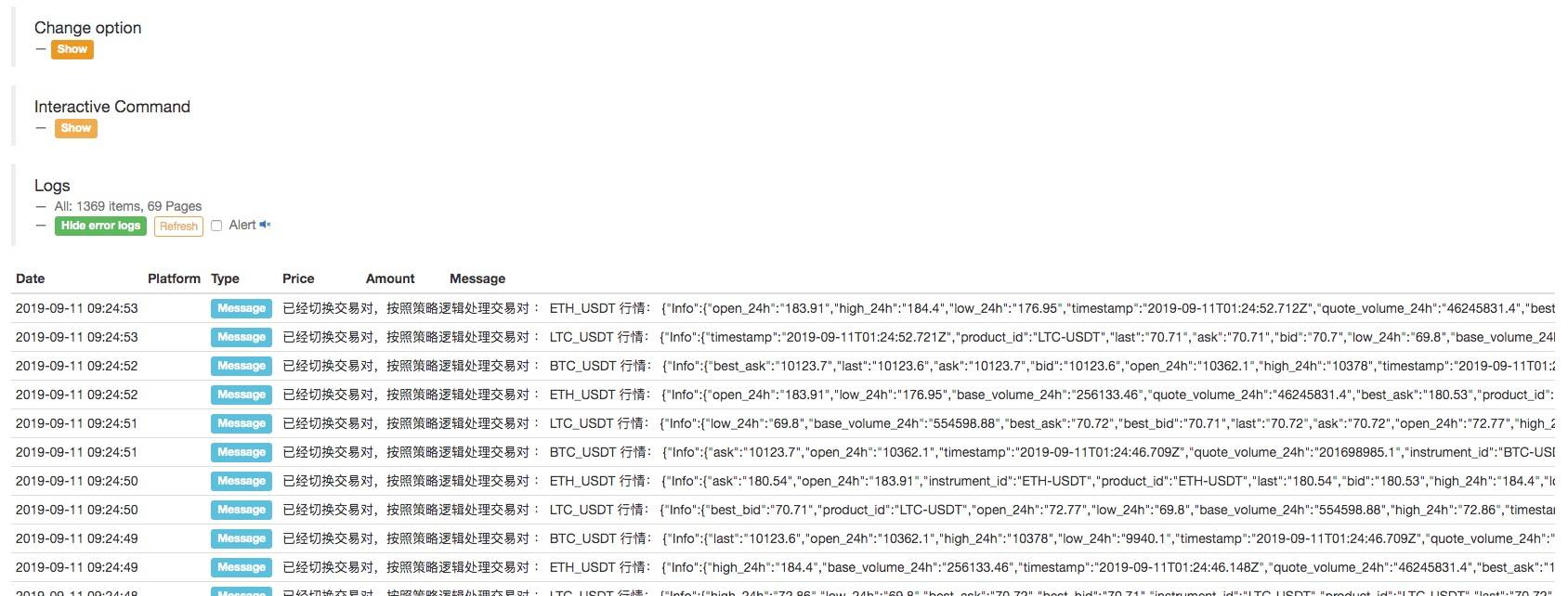
可以看出,这实现了在机器人上配置了一个兑换对象,进行了交易对的切换;获取不同交易对的行情,执行多交易品种行情;它在策略逻辑下执行。
可以看出,我们定义的三个交易对:BTC_USDT、LTC_USDT、ETH_USDT,在循环中,迭代获取行情,获取信息后,可以具体检测行情,触发策略设计的交易逻辑。
可能有读者会问:“我不喜欢切换交易对,感觉有点麻烦,策略逻辑也不清楚。”
确实还有其他设计选项,我们将在下面介绍。
为同一交易所账户中的机器人配置多个交易所对象
不同交易对的行情数据通过多个交易所对象获取,并在迭代策略逻辑中执行。
例如,通过为机器人配置三个交换对象来配置机器人。交易对分别设置为BTC_USDT、LTC_USDT、ETH_USDT。

名称为“OKEX Spot V3 Test”交易所对象,在Dashboard页面,交易所配置页面:

全做完了。
我们对这些代码稍作改动,因为这次我们给机器人添加了多个交易所对象,分别是交易对 BTC_USDT、LTC_USDT、ETH_USDT 的交易所对象。
function Process (e) {
    var ticker = _C(e.GetTicker)
    Log("exchange", e.GetName(), "Process trading pairs according to strategy logic:", e.GetCurrency(), "Quotes:", ticker)
    // ...
    // ..
    // .
}

function main(){
    while (true) {
        for (var i = 0 ; i < exchanges.length; i++) {
            Process(exchanges[i])
            Sleep(500)
        }
    }
}
运行机器人:

上面我们描述的例子,无论是切换交易对还是为一个配置账户的多个不同交易对添加交易对象。所有这些都只是使用交易所账户配置(使用已配置的交易所)。
那么如何在一个策略中使用多个交易所账户呢?
使用多个交易所账户的策略
一些策略如多交易所跨市场对冲、单一交易所内的多账户策略。
- 具有不同交易所的多个交易所配置

例如,我们在 Dashboard -> Exchange -> 添加 Exchange 页面上配置了 2 个 Exchange。
我们可以在策略中访问这两个交易所配置的账户的资产信息。

function main(){
     Log(exchanges[0].GetAccount()) // Print the account asset information of the first exchange object.
     Log(exchanges[1].GetAccount()) // ... Print the asset information of the Bit-Z exchange
}
当然,我也可以在一个交易所中添加第二个和第三个账户的交易所配置。
- 多个交易所配置同一个交易所。
例如,我们为火必期货添加另一个账户。

可以看到,这配置了两个“火必期货”交易所的账户。

创建策略后,机器人的修改配置选项中会出现一个火必期货交易对象供选择。

例如,这允许两个账户使用典型的网格策略先卖出然后买入(向上)或先买入然后卖出(向下)。
通过以上两个例子
以下是在机器人上配置多个交换对象和“为机器人为同一个交换帐户配置多个交换对象”之间的区别:
这与上文提到的“同一个兑换账户有多个兑换对象为机器人”的例子有些相似,但也有区别。
不同的是上面的例子是一个交换配置,即:

当机器人配置交换对象时,它总是使用:

这种配置。
只是当你添加一个交易所对象时,交易对的设置是不同的。
如果调用GetAccount函数,则始终访问同一账户的资产信息。
然而:

这样配置的两个火必期货交易所对象,虽然都是火必期货,但代表不同的交易所账户。
- 交易所配置的使用使加密货币期货策略的设计更加容易。
有时在加密货币合约对冲的策略中,为了抓住转瞬即逝的交易机会,需要同时放置很多场景。但是,由于合约不同,在获取市场报价和下单时需要切换到对应的合约。使用该exchange.Go函数执行下单功能或获取报价时,同步出现问题,不是很快。而switch合约的设计也让逻辑没那么简单。有没有更好的办法?
当然有,我们可以按照“为机器人在同一个交易所账户配置多个交易所对象”添加两个交易所对象给机器人。

然后使用此交换配置添加另一个交换对象。
会弹出一个提示框!

一个交易所账户配置,不能添加相同币种或交易对的交易所对象。
我该怎么办?好像策略机器人不能使用两个交易所对象,交易所对象绑定一个交易所账号?
还是有办法的!
我们进入“仪表盘”->“交易所”,然后添加一个OKEX期货交易所配置。
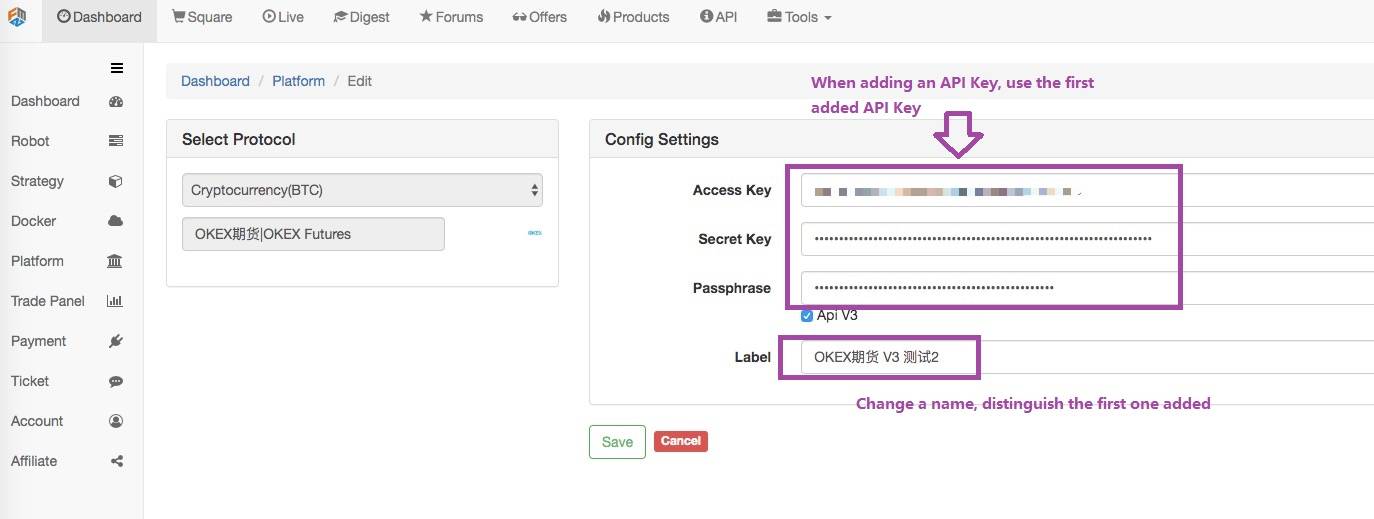
配置好后点击保存。

这样我们就有了两个交换配置,但是使用了相同的 API KEY 配置信息。

这样做有什么好处?
在编写策略时,设计会非常简单!
function main(){
    exchanges[0].SetContractType("quarter") // Set the first added exchange object. The current contract is a quarterly contract.
    exchanges[1].SetContractType("this_week") // Set the second added exchange object, the current contract is the current week contract

    while (true) {
        var beginTime = new Date().getTime() // Record the timestamp from which this time the market quote was taken.
        var rA = exchanges[0].Go("GetTicker") // Create a concurrent thread to get the first exchange object, which is the market data for the quarterly contract.
        var rB = exchanges[1].Go("GetTicker") // Create a concurrent thread to get the second exchange object, which is the market data for the weekly contract.

        var tickerA = rA.wait() // The two threads executing each other perform their own tasks, waiting to get the data. When A waits, the B task is also executing.
        var tickerB = rB.wait() // So it seems to be sequential execution, actually at the bottom of the concurrency. Only when you get the order is to get A first, and get B.
        var endTime = new Date().getTime() // Record the timestamp at the end of the two contract quotes.

        if (tickerA && tickerB) { // If there is no problem with the data obtained, execute the following logic.
            var diff = tickerA.Last - tickerB.Last // calculate the difference
            $.PlotLine("diff", diff) // Use the line drawing library to plot the difference on the chart.
            if (diff > 500) { // If the spread is greater than 500, hedge arbitrage (of course, the difference of 500 is relatively large, rarely seen.)
                // Hedging
                rA = exchanges[0].Go("Sell", tickerA.Buy, 1) // Concurrent threads create a selling order under the quarterly contract
                rB = exchanges[1].Go("Buy", tickerB.Sell, 1) // Concurrent thread create a buying order under the weekly contract

                var idA = rA.wait() // Waiting for the return of placing order results, returning the order ID
                var idB = rB.wait() // ...
            }

            // ...
        }

        LogStatus(_D(), "Concurrently get two contract quotes taking time:", endTime - beginTime, "millisecond.") // Shows the time on the status bar to know that the program is executing.
        Sleep(500)
    }
这种设计策略是不是更简单、更清晰?
真实市场操作:

如您所见,每次只需要大约 50 毫秒即可获得两个合约的价格。


